Installation
System requirements
- Linux with PREEMPT_RT patched kernel (Ubuntu 16.04 or later, Ubuntu 22.04 recommended)
- libfranka installed (tested on version 9.0.2)
- ROS2 (Jazzy)
- libfreenect installed (required for kinect v1 integration)
Install
sudo apt install ros-jazzy-{depth-image-proc,pinocchio,camera-info-manager,realtime-tools}
git clone <repository link>
cd panda_ros
cd yolo_ros
pip3 install -r requirements.txt
cd ..
rosdep install --from-paths src --ignore-src -r -y
colcon build
Overview of the system
The system consists of several ROS2 nodes, each specialized for its own task and divided into different ROS2 packages within the repository:
- panda_interfaces: consisting of messages, services and actions interfaces used in the other packages.
- panda_world: containing the files relative to the simulation and a few nodes bridging the ROS2 controller and keypoint recognition system with the gazebo simulation.
- kinect_ros2: the kinect_ros2 package, allowing the publication of images and depth maps from the kinect v1 to the ROS2 network.
- yolo_ros: the yolo_ros ROS2 package, used for the keypoint recognition using the Ultralytics YOLO models.
- image_processing: consisting of the skeleton tracker algorithm that publishes the TFs of the keypoint, along with other messages regarding the skeleton, on the ROS2 network.
- panda_utils: consisting of the nodes used for the control and data publication of the Franka Emika Panda robot used in this work.
- demo_visulization_app: containing a ROS2 node allowing the activation of the robot's controller and launching the demo.
panda_interfaces
The panda_interfaces package contains all the messages, services and actions used in the project. Most of them are used in the panda_utils package for:
- trajectory generation
- sensors info
- human-robot interaction
- debugging and logging
Actions
Trajectory generation
The actions aimed to the generation of trajectories for the robot are:
CartTrajLoopCartTrajStopTrajJointTraj
All the actions are very similar to each other and really simple in the definition. The implementation are provided in the panda_utils package.
Messages
Commands
The messages used to send commands to the various components of the project (controller, lower level bridges) are:
CartesianCommand: used to send cartesian trajectories to the controllerJointsCommandJointsEffort
The joint level commands are used in an intermediate inverse dynamics controller, solely used to bring the panda robot in a well conditioned configuration before activating the impedance controller (and deactivating the inverse dyn one).
Measures
The messages used for sensor measures and operator relative alerts are:
HumanContactJointTorqueMeasureJointTorqueMeasureStamped
The HumanContact is used to indicate which one of the wrist of the operator is in contact, if any, with one of the robot's frames. The other 2 messages are used to publish the external joint torque measures of the simulated panda robot in the gazebo environment.
Debug
The rest of the messages are used for the publication of debug messages:
DoubleStampedDoubleArrayStampedBodyLengthsJointsPos
Services
The package contains a single service, SetComplianceMode, similar to the SetBool service, used to switch the controller mode from the position control to the compliance control mode.
panda_world
The package contains all the files needed for the gazebo simulation containing the Franka Emika Panda robot, the RGB-D camera and a human actor. The robot and camera models are in the models folder, with the respective meshes in the meshes folder. The config folder contains the config file for the ros_gz bridge.
Nodes
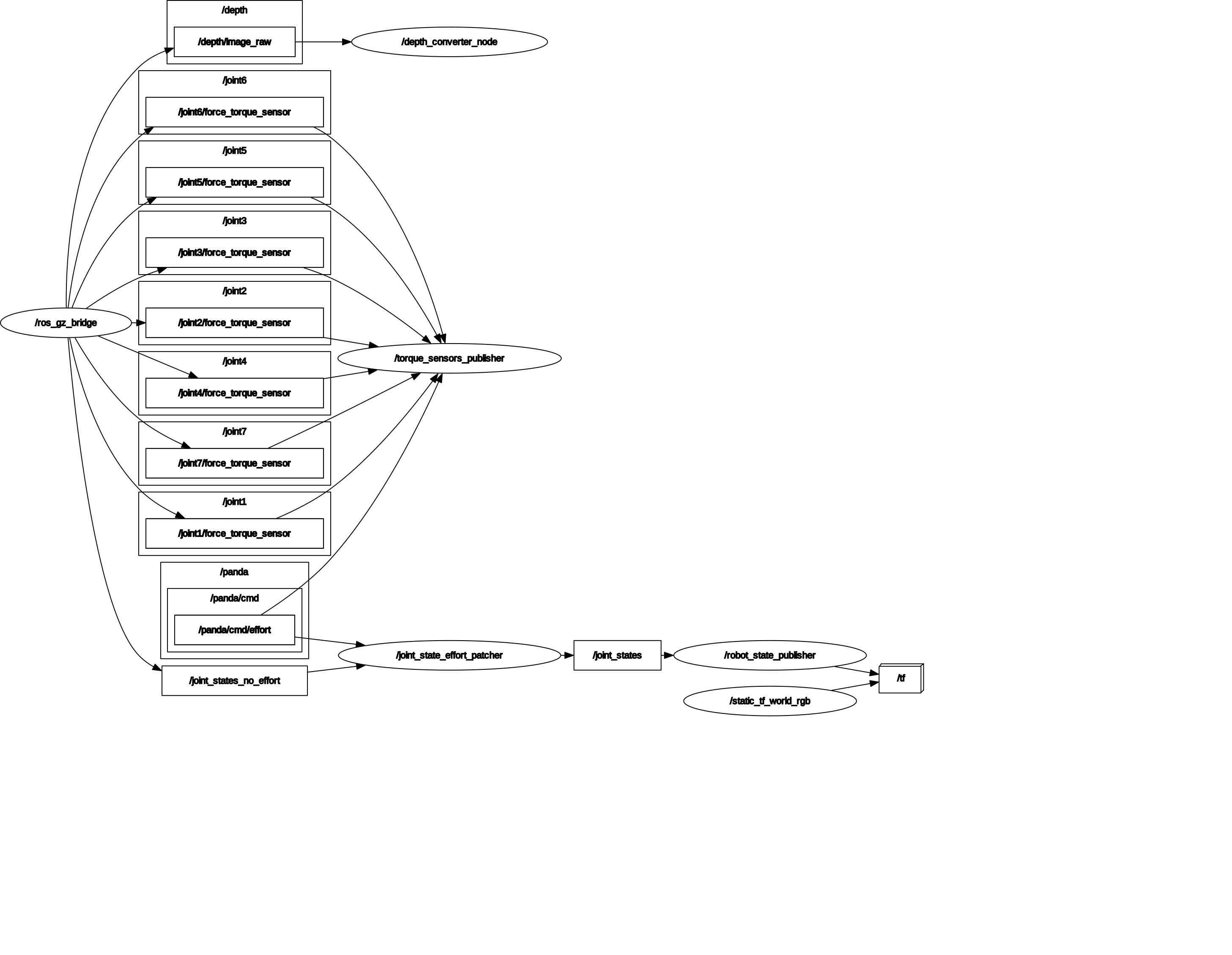
image_converter
The image_converter node converts the gazebo depth map image in 16UC1 format for the YOLO nodes.
joint_state_publisher_effort_patcher
The joint_state_publisher_effort_patcher node republishes the JointState message coming from the bridge to the same ROS2 network updating the torque field with the torque commanded by the controller. This node is required because the JointStatePublisher plugin in gazebo have an open issue regarding the torque exterted by the joints.
torque_sensor_publisher
The torque_sensor_publisher node republishes the external torques acting on the joints as a WrenchStamped message.
Launch files
The package contains one launch file that spawns several nodes along with the gazebo simulation and an rviz2 instance. The nodes publish the Tf2 of the robot link's frame, the robot's joints state, the rgb and depth images.
ROS2 network
kinect_ros2
The package defines the depth and rgb camera calibration parameters in the cfg folder used to publish the relative CameraInfo messages.
Launch files
The stream_kinect.py launch file allows to define:
- the Tfs of the camera wrt the world frame (camera extrinsic parameters)
- the topic on which the RegisterNode subscribes. The RegisterNode reproject the depth map relatively to the rgb camera, allowing to use a unique CameraInfo message for both the images.
yolo_ros
The ROS2 wrapper for Ultralytics YOLO models. In this project it has been used for 3D human pose detection of the operator in the scene seen by the kinect camera. The pipeline expects an rgb image and eventually a depth image to estimate the keypoint on the human body (17, defined in the COCO-Pose dataset), outputting a DetectionArray message containing all the human detections.
The pipeline have been used to detect only 1 human in the scene. The model used is the yolov8n-pose.
Launch files and parameters
The launch file to use with the model chosen is the yolov8.launch.py in the yolo_bringup sub-package. The parameters used are the following:
- model: YOLO model to use
- max_det: maximum number of detections
- input_image_topic: camera topic of RGB image
- input_depth_topic: camera topic of depth image
- input_depth_info_topic: camera topic for info data
- target_frame: frame to transform the 3D keypoints
- use_3D: whether to activate 3D detections
- use_sim_time: whether to consider real or sim time
Example:
ros2 launch yolo_bringup yolov8.launch.py model:=yolov8n-pose.pt max_det:=1\
input_image_topic:=/image_raw input_depth_topic:=/depth/image_raw\
input_depth_info_topic:=/camera_info target_frame:=kinect_rgb\
use_3d:=True use_sim_time:=False
image_processing
The image_processing package aims to smooth the output given by the YOLO model implementing a kalman filter and an heuristic to keep track of the tracked operator in the scene.
Nodes
skeleton_tracker_yolo
The skeleton_tracker_yolo is the only node in the package. It depends on two messages coming from the network:
- the DetectionArray, describing the keypoints of the operator in the scene, in terms of 3D components relative to a frame in the Tf tree.
- the Image of the current scene.
The node's outputs are:
- the Tfs of the keypoints filtered
- a MarkerArray message representing the operator's skeleton, that is, the union of the keypoints with segments in space.
- the Image of the current scene, containing the keypoints filtered by the node.
The synchronized_callback function contains the main logic of the node, running everytime a pair of these messages are received using the message_filters package to synchronize the reception based on their timestamps.
The function performs the following operations, in order:
- fill a map with the current keypoints from the DetectionArray based on their unique id (1-17), excluding those outside the depth range of the camera.
- Update the decision metrics based on current and past keypoint confidence score. The metrics are relative to single keypoints and to the entire tracking state of the node.
- Based on the decision metrics the state of the tracker is updated, along with the kalman filter states.
- The node's outputs are published to the networks.
Tracking states
The node defines 3 states for the tracking process:
- NO_PERSON: there is no currently tracked operator in the scene. This is the initial state of the node.
- PERSON_TRACKED: the node is tracking the operator inside the scene. The transition happens based on the moving average of the keypoints' moving average confidence score and the number of the current valid keypoints. $$ conf_{MA} = \frac{\sum_i conf_{MA}^{Kp_i}}{m} \\ m = \{ Kp_i \: | \: conf_{MA}^{Kp_i} \geq Kp_{conf\: thresh} \; \text{and} \; conf^{Kp_i} \geq Kp_{conf \: hallucination} \} = \text{number of valid keypoints} \\ conf^{Kp_i} = \text{single keypoint current confidence score}\\ conf_{MA} \geq conf_{MA \: thresh} \; \text{and} \; m \geq m_{thresh} $$
- PERSON_LOST: the node is still tracking the operator but the total confidence is under the threshold. The node remains in this state for a certain amount of time before transitioning to the NO_PERSON state. If the confidence exceeds the threshold again the state will return to PERSON_TRACKED.
Decision metrics
- \( Kp_{conf\: thresh} \): threshold relative to the single keypoint moving average confidence score.
- \( Kp_{conf\: hallucination} \): threshold relative to the single keypoint hallucination confidence score; the threshold is used to avoid the keypoints that have a really low score in the total moving average calculation at each time step.
- \( conf_{MA\: thresh} \): threshold relative to the total moving average confidence score; it is the primary index used for state transitions.
- \( m_{thresh} \): minimum number of valid keypoints required to transition to the PERSON_TRACKED state.
- \( T_{lost} \): maximum time the node can remain in the PERSON_LOST state.
Kalman filter
As stated in the introduction the node implements a kalman filter on the various keypoints of the skeleton. The filter handles various things:
- sensor noise derived from the depth sensor.
- prediction of the keypoint position in case of occlusions.
- outlier removal caused by strong noise fluctuations/occlusions that greatly change the depth value returned by the sensor.
A constant velocity model is used for each keypoint. This assumption is obviously not true, so the covariance matrix of the process noise is used to characterize the acceleration of the keypoint in each direction, along the lines of a uniformly accelerated motion. Using this approach the process noise covariance matrix depends on the interval of time between 2 consecutive call of the filter's update function.
The output noise is simply a diagonal matrix with the same covariance value for all directions.
The removal of the outlier is based on the mahalanobis distances of the innovation computed at each step; the distance is then compared to the quantile of a \( \chi^2 \) distribution with 3 degrees of freedom and with a confidence level of 0.9 (90%): if the distance is less than the quantile, the measure is accepted and the update step of the filter is computed; otherwise, it is rejected and the filter compute only the prediction step.
Launch files and parameters
The package contains a single launch file spawning the node. The paramers are the following:
- use_sim_time
- ma_confidence_threshold, hallucination_threshold, single_keypoint_ma_confidence_threshold: decision metrics relative thresholds
- ma_window_size: window size to consider for moving average
- filter: whether or not use the kalman filter for the keypoints
- predict: whether or not to predict the position of the keypoints when skeleton is lost
- debug: whether or not print debug info
An example of launch file:
ros2 launch image_processing launch_yolo_tracker.py measurement_noise:=0.9 hallucination_threshold:=0.0 single_keypoint_ma_confidence_threshold:=0.80 ma_confidence_threshold:=0.80 MA_window_size:=10 use_sim_time:=false filter:=true debug:=true predict:=false
panda_utils
The panda_utils package contains all the nodes used to control the robot, whether real or simulated. The main node is the impedance_controller node, implementing the impedance law and other useful modules to bridge the libfranka library, used to communicate with the Franka Emika Panda robot, and the rest of the ROS2 network when using the physical robot.
Moreover, the package contains all the nodes used to generate trajectories for the robot's end effector in different situations, nodes used to estimate the distance from the operator keypoints and the robot frames, and the node implementing the entire project's demo.
Nodes
impedance_controller
The impedance_controller node allows to control the robot with a cartesian impedance law. The node has 2 possible mode of operation:
sim: the node expects a simulation running, sending and receiving robot commands and state throught the gz_bridge.franka: the node expects a robot_ip to be declared on which the communication has to be established. Upon activation of the node, the main thread is spawned starting the control loop of the robot. Along with this one, there are other thread publishing robot state on the network.
There are many parameters that can be chosen to customize the behaviour of the controller:
- controller gains (Kp, Kd, Md, translation and rotational)
- controller frequency
- safe range values (max joint speed, max effort value, ...)
- mode of operation
A more in depth analysis of the node is proposed in robot_controller
frame_publisher
The frame_publisher node publishes the frames relative to the robot when the franka mode is used: differently from the simulation mode, the franka mode doesn't have a ROS2 integration when the libfranka library is used as is. Because of that, we use the Pose of each robot's frame to publish the corresponding Tfs in the network and build the kinematic chain representation. The node offers a ROS2 service that can be enabled to start the publishing of the frames based on a PoseArray message.
send_joints_effort_cmd
This node simply unpacks the JointsEffort message, sending the corresponding effort value to each of the robot's joints in the simulation environment, through the gz_bridge.
cart_traj
The cart_traj node implements the CartTraj action defined in the panda_interfaces package. The trajectory is generated using a quintic polynomial, ensuring the continuity of position, velocity and accelerations.
If the action is canceled the node generates a trajectory that brings the velocity to 0, according to the one used in the exponential_cart_traj node
loop_cart_traj
The loop_cart_traj node implements the LoopCartTraj action defined in the panda_interfaces package. The action accepts an array of Pose and cycle through them generating segment trajectories between two subsequent poses. The first pose is used as a check: if the robot is not in the first position the action is aborted.
exponential_cart_traj
The exponential_cart_traj node implements the StopTraj action in the panda_interfaces package. The trajectory generated brings the velocity of the EE to 0 with an exponential law. The acceleration and the position are respectively derived and integrated from the velocity expression being:
$$
v_i(t) = \alpha e^{-\lambda t} + \beta e^{-\gamma t}\, , i = {x, y, z}
$$
human_presence
The human_presence node computes the distances between the robot's frames and the operator's keypoints, indicating when the operator enters the virtual robotic cell and which frame is in contact with any of the operator's wrists. The node uses the Tf2 system to retrieve all the robot and operator Tfs and then compute the distances as
$$
d = ||kp_i - frame_j||\,, i = {1,...,17},\, j={1,...,7}.
$$
The node then compare each of the distances with a threshold: if lower than the threshold value the operator is considered inside the cell. After a certain interval in which the condition is true, the operator is considered to be inside the cell.
If the operator is inside the cell then the distance between the wrists and the robot's frame is computed: if the smallest of these distances happens to be under a certain threshold, the pair of wrist and frame is considered in contact.
The node allows to define the contact and no_contact threshold with ROS2 parameters. The 2 thresholds are used to prevent that the frame in contact is changed frequently, degrading the control: the no_contact threshold has to be chosen greater than the contact one, so that the operator has to move away the hand from the frame in contact and only then touch another frame.
demo
The demo node implements a complete demo of the project, featuring the robot controller, the trajectory generators, the keypoint estimation and the compliance mode. 5 states are used to take decisions in the demo:
enum class SceneState {
  // The robot has to be moved in home pose
  no_state,
  // The robot is doing whichever task has to do
  task,
  // The human enters the robot area and the robot has to enter compliance
  // mode
  transition_human,
  // The robot is in compliance mode: it can be freely moved by the human
  compliance,
  // The human leaves the robot area, allowing the robot to return in home pose and resume task
  transition_leave_human,
};
The demo is started/stopped through a SetBool service.
The task accomplished by the robot is an infinite cartesian trajectory describing a triangle in a fixed plane in space, with a constant orientation. The demo can be monitored with the node described in the next section.
Launch files and parameters
The package contains one launch file that launches the various nodes used to control and command the robot with or without an operator inside the camera view. The parameters of the file are the following:
- use_sim_time: whether to consider real or sim time
- controller_kp, controller_kd, controller_md, controller_kp_rot, controller_kd_rot, controller_md_rot: controller gains
- control_rate: controller rate
- use_robot, robot_ip: whether or not to use real robot and associated IP on the subnet
- world_base_link: robot's base frame to world transform as [x, y, z, w, x, y, z]
- safe_joint_speed: maximum joint speed
- safe_effort_perc: maximum percentage of maximum control torque allowed
- wrist_estimation: whether or not estimate the wrist-frame contact
- contact_threshold, no_contact_threshold
- home_pose: translational part for the home pose of the robot in the demo
demo_visualization_app
The demo_visualization_app package contains a single node, runned without the usage of launch files, that spawns a gui capable of running and stopping both the controller and the demo. Furthermore, the gui can be used to check the status of the demo and the frame in contact with the operator, depending on the color and the label in the central section of the window.
Nodes
color_node_app
color_node_app is the only node in the package, it can be runned through the ros2 run command specifying the topic the app has to listen on for the state of the demo, and the topic where the wrist and the frame in contact are published. The name of the service and the bash script that the node execute are specified in the file.
The state topic is expected to publish ColorRGBA messages indicating the state of the demo with a state associated to each color:
- black: no_state
- task: green
- yellow: transition_human
- red: compliance
- blue: transition_leave_human
The other topic expects a HumanContact message containing the name of the wrist and frame in contact.
The buttons of the app are used to:
- activate/deactivate the impedance controller: through 2 different bash scripts that activate/deactivate the impedance lifecycle node.
- run/stop the demo: using the service exposed by the demo node.
An example of the ROS2 command to spawn the gui with the predefined topic names and the bash script in the repo is:
ros2 run demo_visualization_app color_app "state_color" "human_contact"
Using the system
The project contains a few files useful for the usage of the various components of the system. In addition, the nodes defined in the various packages can be easily modified to:
- implement various controllers
- implement a different trajectory generator
- implement a different heuristic for the keypoint tracking
- using a different model to estimate the keypoints on the images
- using a different camera
Bash scripts and lifecycle nodes
The controller node is implemented as a lifecycle node. To configure and activate the node some bash scripts are used, allowing to start/stop the controller, start both the inverse dyn and the impedance controller (for simulation), only activate the impedance controller. The scripts are located in the root of the repo.
Robot controller
The impedance_controller node can be easily reused to implement other control law, acting in joint or operational space. The focus will be on the 2 main functions of the node
on_configure(const rclcpp_lifecycle::State &)
...
on_activate(const rclcpp_lifecycle::State &)
allowing to characterize almost entirely the behaviour of the controller.
on_configure
This function initialize almost all the parameters of the node, and depending on the mode of operation chosen for the controller, initialize the communication with the Franka Emika panda robot using the FCI.
The first part of the function is used to initialize the common resources to both the modes:
- the publishers used for debug, with a helper
DebugPublisherclass, - the controller gains and control update frequency.
After this section the simulation doesn't need additional setup.
If we are communicating with the FCI we need to:
- instantiate the communication, using the robot ip,
- set the collision behaviour according to the control law chosen,
- set the load on the robot.
Eventually, we can print some useful debug information.
In the same function i've defined the robot_control_callback. This is the callback we pass to the libfranka control function that spawns a real-time thread and controls the robot at a fixed frequency of 1 kHz.
robot_control_callback
The most important function to modify for the implementation of a different control strategy. Within the function:
- the robot status is read,
- the quantities useful for control are computed,
- the control input vector is computed,
- the portions of the status useful for debugging and monitoring purpose on the ROS2 network are copied into dedicated structures,
- the internal status of the robot and the forward kinematics are published.
The publication of the status and fkine of the robot in the same thread is done to always keep the updated state on the network. The dedicated structures are simply mutex guarded structure used to copy the robot state and publish it from another thread, lightening the main control thread.
The only thread that needs to be real-time is the control thread spawned by libfranka, so the other threads can be spawned with simple threads or can be used a much lower priority if spawned in real-time.
An example of a robot_control_callback function can be found in the impedance_controller node of the project of course. Furthermore, the function used in the impedance controller node implements a torque level control: the libfranka library accepts also function that allows to control the robot at higher level, with joint or cartesian velocites signals for example.
on_activate
The second function that should be modified is the on_activate one. This function, like on_configure, is divided in 2 sections: one is common to both the modes of operation and one is specialized depending on the mode chosen.
If the robot is controlled in the simulated environment, the function simply spawns the control thread that communicates with the gazebo env through the publisher and the subscribers of the netowrk. The control thread function is named control() and is almost identical to the robot_control_callback, implementing the same control law.
If the robot is controlled through the FCI the function spawns several threads, each with its own purpose:
- a thread that publishes only the
Poses of the robot's frames. - A thread that updates internal compliance mode variables, allowing the robot to compute jacobian, pose, and current external wrench, depending on the operator's point of contact with the robot, and modifying the controller gains on the fly.
- A thread publishing debug infos, reading the mutex guarded structure shared with the robot_control_callback.
- The control thread spawned with the control function of the libfranka lib, after configuring the SCHED_FIFO priority to 99.
The function can be easily expanded adding other threads one would like to spawn.
Publishers, subscribers, services and parameters
Of course, if one wants to implement different control laws, one would need additional publisher/subscriber objects to communicate with the ROS2 network, other services to implement different behaviors, or new parameters to be specified. All of this can be implemented using the controller class as a starting template, communicating with the FCI using the object's internal structures and implementing the necessary logic within callbacks, threads, and the robot_control_callback function.
Implementing a control law
As said, to implement a control law with this setup we need to modify primarly the robot_control_callback. Following the instructions in the dedicated section we'll now implement an impedance control law in the cartesian space.
First thing first, this is the signature of the function
auto get_jacob = [this](
const Eigen::Vector<double, 7> ¤t_joint_pos) {
auto state = franka::RobotState{};
for (size_t i = 0; i < state.q.size(); i++) {
state.q[i] = current_joint_pos[i];
}
if (compliance_mode.load() && last_joint_contact_frame.has_value()) {
jacobian = geom_utils::get_jacobian(panda_franka_model->zeroJacobian(
last_joint_contact_frame.value(), state));
} else {
jacobian = geom_utils::get_jacobian(
panda_franka_model->zeroJacobian(franka::Frame::kFlange, state));
}
return jacobian;
};
robot_control_callback =
[this, get_jacob](const franka::RobotState &state,franka::Duration dt)
-> franka::Torques
{
if (!(start_flag.load() && rclcpp::ok())) {
// Send last commanded joint effort command
return franka::MotionFinished(franka::Torques(state.tau_J_d));
}
...
}
The get_jacob function is used to calculate the jacobian, based on the last_joint_contact_frame the operator touches, if there's any.
The first if statement inside the callback is used to stop the control thread, and requires the last commanded torque command to be sent.
{
  std::lock_guard<std::mutex> mut(desired_cartesian_mutex);
  update_cartesian_cmd();
}

// Get q and q_dot
//
Eigen::Map<const Eigen::Vector<double, 7>> current_joints_config_vec(
    state.q.data());

if (dt.toSec() != 0.0) {
  for (int i = 0; i < 7; i++) {
    current_joints_speed[i] = franka::lowpassFilter(
        dt.toSec(), state.dq[i], current_joints_speed[i],
        joints_speed_cutoff_freq);
  }

} else {
  for (int i = 0; i < 7; i++) {
    current_joints_speed[i] = state.dq[i];
  }
}
Then, we need to access the desired cartesian commands, relative to the pose, velocity and acceleration of the end-effector. We acquire the current joints' position and speed, filtering the latter.
Pose current_pose;
Eigen::Quaterniond error_quat{};
Eigen::Vector<double, 6> error_pose_vec{};
std::array<double, 49> mass_matrix_raw;

if (compliance_mode.load() && last_joint_contact_frame.has_value()) {

  current_pose = geom_utils::get_pose(panda_franka_model->pose(
      last_joint_contact_frame.value(), state));

  jacobian = geom_utils::get_jacobian(panda_franka_model->zeroJacobian(
      last_joint_contact_frame.value(), state));

} else {

  current_pose = geom_utils::get_pose(
      panda_franka_model->pose(franka::Frame::kFlange, state));

  jacobian = geom_utils::get_jacobian(
      panda_franka_model->zeroJacobian(franka::Frame::kFlange, state));

}

Eigen::Quaterniond current_quat{};
current_quat.w() = current_pose.orientation.w;
current_quat.x() = current_pose.orientation.x;
current_quat.y() = current_pose.orientation.y;
current_quat.z() = current_pose.orientation.z;
current_quat.normalize();
current_quat = quaternionContinuity(current_quat, old_quaternion);
old_quaternion = current_quat;

// Calculate pose error
Eigen::AngleAxisd error_angle_axis;
{
  Eigen::Quaterniond desired_quat{};
  desired_quat.w() = desired_pose.orientation.w;
  desired_quat.x() = desired_pose.orientation.x;
  desired_quat.y() = desired_pose.orientation.y;
  desired_quat.z() = desired_pose.orientation.z;
  desired_quat.normalize();

  error_quat = desired_quat * current_quat.inverse();
  error_quat.normalize();
  error_angle_axis = Eigen::AngleAxisd{error_quat};

  error_pose_vec(0) = desired_pose.position.x - current_pose.position.x;
  error_pose_vec(1) = desired_pose.position.y - current_pose.position.y;
  error_pose_vec(2) = desired_pose.position.z - current_pose.position.z;
  error_pose_vec(3) = error_quat.x();
  error_pose_vec(4) = error_quat.y();
  error_pose_vec(5) = error_quat.z();
}
In this snippet of code we compute the pose error as
$$
\tilde{\bar{x}} = \begin{bmatrix} x_{d} - x_{e} \cr y_{d} - y_{e} \cr z_{d} - z_{e} \cr vec(Q_d * Q_e^{-1}) \end{bmatrix}
$$
and the current angle error for debug purposes. The quaternionContinuity function helps avoding big jumps between the previous and the current quaternion.
mass_matrix_raw = this->panda_franka_model.value().mass(state);
Eigen::Map<const Eigen::Matrix<double, 7, 7>> mass_matrix(
    mass_matrix_raw.data());

Eigen::Map<const Eigen::Matrix<double, 7, 1>> coriolis(
    this->panda_franka_model.value().coriolis(state).data());

// Calculate jacobian SVD
Eigen::JacobiSVD<Eigen::MatrixXd> svd(
    jacobian, Eigen::ComputeThinU | Eigen::ComputeThinV);
double sigma_min = svd.singularValues().tail(1)(0);

Eigen::Matrix<double, 7, 6> jacobian_pinv =
    compute_jacob_pseudoinv(jacobian);
Then, we calculate the \(B(q)\) matrix, the coriolis terms and the pseudo-inverse of the geometrical jacobian.
Eigen::Map<const Eigen::Vector<double, 7>> tau_ext_measured(
    state.tau_ext_hat_filtered.data());

Eigen::Matrix<double, 7, 6> jacobian_transposed = jacobian.transpose();

if (dt.toSec() == 0.0) {
  extern_tau = extern_tau.Zero();
} else {
  for (int i = 0; i < 6; i++) {
    extern_tau[i] =
        franka::lowpassFilter(dt.toSec(), tau_ext_measured[i],
                              extern_tau[i], external_tau_cutoff_freq);
  }
}

Eigen::Vector<double, 7> tau_ext = extern_tau;
if (dt.toSec() == 0.0) {
  h_e = h_e.Zero();
} else {
  if (compliance_mode.load() && last_joint_contact_frame.has_value()) {
    int index = 0;
    switch (last_joint_contact_frame.value()) {
    case franka::Frame::kJoint1: {
      index = 0;
      break;
    }
    case franka::Frame::kJoint2: {
      index = 1;
      break;
    }
    case franka::Frame::kJoint3: {
      index = 2;
      break;
    }
    case franka::Frame::kJoint4: {
      index = 3;
      break;
    }
    case franka::Frame::kJoint5: {
      index = 4;
      break;
    }
    case franka::Frame::kJoint6: {
      index = 5;
      break;
    }
    case franka::Frame::kJoint7: {
      index = 6;
      break;
    }
    case franka::Frame::kFlange: {
      index = 6;
      break;
    }
    case franka::Frame::kEndEffector:
    case franka::Frame::kStiffness:
      break;
    }
    for (int i = index + 1; i < tau_ext.size(); i++) {
      tau_ext[i] = 0.0;
    }
  }
  h_e_measured =
      compute_jacob_pseudoinv_h_e(jacobian_transposed) * tau_ext;

  h_e = h_e_measured;
}
Then we have to acquire the external forces sensed by the arm along its joints. We filter these values another time, after the libfranka lib. To compute the external wrench applied to the end-effector considered we need to zero out the torques contributes relative to the subsequent frames to the one touched by the operator, e.g. if the operator toches the 4th frame, we consider only the torques acting on joints 1-4. This is done by the switch statement in the snippet. This last procedure is only necessary in case of compliance mode behaviour.
Eigen::Vector<double, 7> y;
Eigen::Vector<double, 6> y_cartesian;
Eigen::Vector<double, 6> current_twist;
Eigen::Vector<double, 6> error_twist;
{
  current_twist = jacobian * current_joints_speed;
  error_twist = desired_twist_vec - current_twist;
}

{
  if (compliance_mode.load()) {

    y = jacobian_pinv * MD_1 *
        (
          -KD * current_twist
          - MD *
           get_j_dot(get_jacob, current_joints_config_vec,
                     current_joints_speed) *
           current_joints_speed
          - h_e
        );
  } else {
    y_cartesian =
        (
          MD * desired_accel_vec +
          KD * error_twist + KP * error_pose_vec
          -MD *
              get_j_dot(get_jacob, current_joints_config_vec,
                        current_joints_speed) *
              current_joints_speed
          - h_e
        );
    y = jacobian_pinv * MD_1 * y_cartesian;
  }
}

Eigen::Vector<double, 7> control_input_vec =
    mass_matrix * y + coriolis + extern_tau;

// Clamp tau
clamp_control(control_input_vec);
Finally, we can compute the control input torques according to the law. After computing the velocity error (error_twist), depending on whether or not we are in compliance mode the control law includes the acceleration and pose error terms. In the last line of code the control input is then clamped based on torque limits.
The torque commanded to the low-level interface is just a part of the total torque commanded by the libfranka library. In fact, the real torque commanded to the arm is the sum of 3 terms:
- \(tau_d\) = user commanded torque
- \(tau_g\) = torque required for gravity compensation
- \(tau_f\) = torque required to compensate motor friction
Because of this, our computed control torque doesn't include neither the gravity term nor the friction one.
// Safety checks
if (dt.toSec() == 0.0) {
  for (int i = 0; i < control_input_vec.size(); i++) {
    control_input_vec[i] = 0.0;
  }
} else {

  RCLCPP_INFO_STREAM_ONCE(this->get_logger(), "Running safety checks");
  try {
    for (int i = 0; i < control_input_vec.size(); i++) {
      if (abs(control_input_vec[i]) >=
          percentage_effort_safe_limit * effort_limits[i]) {
        RCLCPP_INFO_STREAM_ONCE(this->get_logger(),
                                "Running safety check: effort limit");
        RCLCPP_ERROR_STREAM(this->get_logger(),
                            "Torque abs value over limit ("
                                << percentage_effort_safe_limit * 100.0
                                << "%)");
        panda_franka->stop();
        start_flag.store(false);
        return franka::MotionFinished(franka::Torques(state.tau_J_d));
      } else if (abs(state.dq[i]) >= joint_speed_safe_limit) {
        RCLCPP_INFO_STREAM_ONCE(
            this->get_logger(),
            "Running safety check: joint limit speed");
        RCLCPP_ERROR_STREAM(this->get_logger(),
                            "Joint velocity over the safety value "
                                << joint_speed_safe_limit);
        panda_franka->stop();
        start_flag.store(false);
        return franka::MotionFinished(franka::Torques(state.tau_J_d));
      }
    }
    if (current_pose.position.z <= 0.15) {
      RCLCPP_ERROR_STREAM(this->get_logger(),
                          "Height of the end affector wrt base under "
                          "allowed value 0.15m");
      panda_franka->stop();
      start_flag.store(false);
      return franka::MotionFinished(franka::Torques(state.tau_J_d));
    }

  } catch (std::exception &ex) {
    RCLCPP_ERROR_STREAM(this->get_logger(),
                        "Error in safety checks: " << ex.what());
    panda_franka->stop();
    start_flag.store(false);
    return franka::MotionFinished(franka::Torques(state.tau_J_d));
  }
  RCLCPP_INFO_STREAM_ONCE(this->get_logger(),
                          "Finished safety checks first time");
}
last_control_input = control_input_vec;

if (control_input_vec.array().isNaN().any() ||
    control_input_vec.array().isInf().any()) {
  RCLCPP_ERROR_STREAM(
      this->get_logger(),
      "Control input vec Nan or Inf: "
          << control_input_vec
          << ", Desired pose: " << desired_pose.position.x << ", "
          << desired_pose.position.y << ", " << desired_pose.position.z
          << ", Desired twist: " << desired_twist_vec
          << ", Desired accel: " << desired_accel_vec
          << ", Jacobian pinv: " << jacobian_pinv << ", error twist: "
          << error_twist << ", error pose: " << error_pose_vec
          << ", extern_tau: " << extern_tau << ", coriolis: "
          << coriolis << ", joint vel: " << current_joints_speed
          << ", jacobian: " << jacobian
          << ", current joint pos: " << current_joints_config_vec);

  panda_franka->stop();
  start_flag.store(false);
  return franka::MotionFinished(franka::Torques(state.tau_J_d));
}
Before sending the torques to the libfranka low-level interface, we run a few safety checks on:
- torque values
- joints's speed
- end-effector height (to avoid table contact)
An additional check is run to see if any of the torques, for whatever reason, is equal to NaN or Inf, printing all the control related variables for debugging.
All the checks, if failed, immediately stop the control thread.
std::array<double, 7> tau;
for (size_t i = 0; i < 7; ++i) {
  tau[i] = control_input_vec[i];
}

RCLCPP_INFO_STREAM_ONCE(this->get_logger(), "Filling debug data");

// Fill struct for TFs prints
if (panda_franka_state.mut.try_lock()) {
  panda_franka_state.state = state;
  panda_franka_state.mut.unlock();
}

// Fill struct for debug data publishing
if (debug_pub.data().mut.try_lock()) {

  try {
    debug_pub.data().h_e = h_e_measured;
    debug_pub.data().h_e_calculated = h_e;
    debug_pub.data().tau_ext = tau_ext_measured;
    debug_pub.data().tau_ext_calculated = extern_tau;
    debug_pub.data().error_theta =
        error_angle_axis.angle() * 180.0 / M_PI;
    debug_pub.data().sigma_min = sigma_min;
    debug_pub.data().current_twist = current_twist;
    debug_pub.data().des_twist = desired_twist;
    debug_pub.data().des_accel = desired_accel;
    debug_pub.data().current_j_dot_q_dot =
        get_j_dot(get_jacob, current_joints_config_vec,
                  current_joints_speed) *
        current_joints_speed;
    debug_pub.data().gravity = panda_franka_model->gravity(state);
    debug_pub.data().coriolis = coriolis;
    debug_pub.data().filtered_joints_vec = current_joints_speed;
    debug_pub.data().error_pose_vec.head(3) = error_pose_vec.head(3);
    debug_pub.data().error_pose_vec.tail(3) = error_pose_vec.tail(3);
    // w value of the pose message in a vector<7>
    debug_pub.data().error_pose_vec(3) = 1.0;
    debug_pub.data().tau_d_calculated = tau;
    debug_pub.data().tau_d_last = state.tau_J_d;
    debug_pub.data().tau_read = state.tau_J;
    debug_pub.data().y = y;
    debug_pub.data().y_cartesian = y_cartesian;

    // Robot state
    debug_pub.data().robot_state->q = state.q;
    debug_pub.data().robot_state->dq = state.dq;
    debug_pub.data().robot_state->O_T_EE = state.O_T_EE;
    debug_pub.data().current_pose = current_pose;
    debug_pub.data().has_data = true;
  } catch (std::exception &ex) {
    RCLCPP_ERROR_STREAM(
        this->get_logger(),
        "Error copying data in controller: " << ex.what());
  }
  debug_pub.data().mut.unlock();
}

// The pose and the joints' values are published directly by the main
// control thread
PoseStamped pose_stamp;
pose_stamp.header.stamp = this->now();
pose_stamp.pose = current_pose;
robot_pose_pub->try_publish(pose_stamp);

joint_state_to_pub.header.stamp = this->now();
for (size_t i = 0; i < joint_state_to_pub.position.size(); i++) {
  joint_state_to_pub.position[i] = state.q[i];
  joint_state_to_pub.velocity[i] = state.dq[i];
  joint_state_to_pub.effort[i] = state.tau_J[i];
}

joint_states_pub->try_publish(joint_state_to_pub);

RCLCPP_INFO_STREAM_ONCE(this->get_logger(), "Sent command first time");
return franka::Torques(tau);
In the end, we fill the libfranka struct for torque command, update the debug structs use for the publication of robot related variables, publish directly in the callback the current pose and joint configuration of the robot, and then as final line, we return the input torques.
The whole callback composed by all these pieces is reported in the next snippet of code
robot_control_callback =
    [this, get_jacob](const franka::RobotState &state,
                      franka::Duration dt) -> franka::Torques {
  if (!(start_flag.load() && rclcpp::ok())) {
    // Send last commanded joint effort command
    return franka::MotionFinished(franka::Torques(state.tau_J_d));
  }

  {
    std::lock_guard<std::mutex> mut(desired_cartesian_mutex);
    update_cartesian_cmd();
  }

  // Get q and q_dot
  //
  Eigen::Map<const Eigen::Vector<double, 7>> current_joints_config_vec(
      state.q.data());

  if (dt.toSec() != 0.0) {
    for (int i = 0; i < 7; i++) {
      current_joints_speed[i] = franka::lowpassFilter(
          dt.toSec(), state.dq[i], current_joints_speed[i],
          joints_speed_cutoff_freq);
    }

  } else {
    for (int i = 0; i < 7; i++) {
      current_joints_speed[i] = state.dq[i];
    }
  }

  Pose current_pose;
  Eigen::Quaterniond error_quat{};
  Eigen::Vector<double, 6> error_pose_vec{};
  std::array<double, 49> mass_matrix_raw;

  if (compliance_mode.load() && last_joint_contact_frame.has_value()) {

    current_pose = geom_utils::get_pose(panda_franka_model->pose(
        last_joint_contact_frame.value(), state));

    jacobian = geom_utils::get_jacobian(panda_franka_model->zeroJacobian(
        last_joint_contact_frame.value(), state));
  } else {
    current_pose = geom_utils::get_pose(
        panda_franka_model->pose(franka::Frame::kFlange, state));
    jacobian = geom_utils::get_jacobian(
        panda_franka_model->zeroJacobian(franka::Frame::kFlange, state));
  }

  Eigen::Quaterniond current_quat{};
  current_quat.w() = current_pose.orientation.w;
  current_quat.x() = current_pose.orientation.x;
  current_quat.y() = current_pose.orientation.y;
  current_quat.z() = current_pose.orientation.z;
  current_quat.normalize();
  current_quat = quaternionContinuity(current_quat, old_quaternion);
  old_quaternion = current_quat;

  // Calculate pose error
  Eigen::AngleAxisd error_angle_axis;
  {
    Eigen::Quaterniond desired_quat{};
    desired_quat.w() = desired_pose.orientation.w;
    desired_quat.x() = desired_pose.orientation.x;
    desired_quat.y() = desired_pose.orientation.y;
    desired_quat.z() = desired_pose.orientation.z;
    desired_quat.normalize();

    error_quat = desired_quat * current_quat.inverse();
    error_quat.normalize();
    error_angle_axis = Eigen::AngleAxisd{error_quat};

    error_pose_vec(0) = desired_pose.position.x - current_pose.position.x;
    error_pose_vec(1) = desired_pose.position.y - current_pose.position.y;
    error_pose_vec(2) = desired_pose.position.z - current_pose.position.z;
    error_pose_vec(3) = error_quat.x();
    error_pose_vec(4) = error_quat.y();
    error_pose_vec(5) = error_quat.z();
  }

  mass_matrix_raw = this->panda_franka_model.value().mass(state);
  Eigen::Map<const Eigen::Matrix<double, 7, 7>> mass_matrix(
      mass_matrix_raw.data());

  Eigen::Map<const Eigen::Matrix<double, 7, 1>> coriolis(
      this->panda_franka_model.value().coriolis(state).data());

  // Calculate jacobian SVD
  Eigen::JacobiSVD<Eigen::MatrixXd> svd(
      jacobian, Eigen::ComputeThinU | Eigen::ComputeThinV);
  double sigma_min = svd.singularValues().tail(1)(0);

  Eigen::Matrix<double, 7, 6> jacobian_pinv =
      compute_jacob_pseudoinv(jacobian);

  Eigen::Map<const Eigen::Vector<double, 7>> tau_ext_measured(
      state.tau_ext_hat_filtered.data());

  Eigen::Matrix<double, 7, 6> jacobian_transposed = jacobian.transpose();

  if (dt.toSec() == 0.0) {
    extern_tau = extern_tau.Zero();
  } else {
    for (int i = 0; i < 6; i++) {
      extern_tau[i] =
          franka::lowpassFilter(dt.toSec(), tau_ext_measured[i],
                                extern_tau[i], external_tau_cutoff_freq);
    }
  }

  Eigen::Vector<double, 7> tau_ext = extern_tau;
  if (dt.toSec() == 0.0) {
    h_e = h_e.Zero();
  } else {
    if (compliance_mode.load() && last_joint_contact_frame.has_value()) {
      int index = 0;
      switch (last_joint_contact_frame.value()) {
      case franka::Frame::kJoint1: {
        index = 0;
        break;
      }
      case franka::Frame::kJoint2: {
        index = 1;
        break;
      }
      case franka::Frame::kJoint3: {
        index = 2;
        break;
      }
      case franka::Frame::kJoint4: {
        index = 3;
        break;
      }
      case franka::Frame::kJoint5: {
        index = 4;
        break;
      }
      case franka::Frame::kJoint6: {
        index = 5;
        break;
      }
      case franka::Frame::kJoint7: {
        index = 6;
        break;
      }
      case franka::Frame::kFlange: {
        index = 6;
        break;
      }
      case franka::Frame::kEndEffector:
      case franka::Frame::kStiffness:
        break;
      }
      for (int i = index + 1; i < tau_ext.size(); i++) {
        tau_ext[i] = 0.0;
      }
    }
    h_e_measured =
        compute_jacob_pseudoinv_h_e(jacobian_transposed) * tau_ext;

    h_e = h_e_measured;
  }

  Eigen::Vector<double, 7> y;
  Eigen::Vector<double, 6> y_cartesian;
  Eigen::Vector<double, 6> current_twist;
  Eigen::Vector<double, 6> error_twist;
  {
    current_twist = jacobian * current_joints_speed;
    error_twist = desired_twist_vec - current_twist;
  }

  {
    if (compliance_mode.load()) {

      y = jacobian_pinv * MD_1 *
          (
            -KD * current_twist
            - MD *
             get_j_dot(get_jacob, current_joints_config_vec,
                       current_joints_speed) *
             current_joints_speed
            - h_e
          );
    } else {
      y_cartesian =
          (
            MD * desired_accel_vec +
            KD * error_twist + KP * error_pose_vec
            -MD *
                get_j_dot(get_jacob, current_joints_config_vec,
                          current_joints_speed) *
                current_joints_speed
            - h_e
          );
      y = jacobian_pinv * MD_1 * y_cartesian;
    }
  }

  Eigen::Vector<double, 7> control_input_vec =
      mass_matrix * y + coriolis + extern_tau -
      KD_J * current_joints_speed;

  clamp_control(control_input_vec);

  // Safety checks
  if (dt.toSec() == 0.0) {
    for (int i = 0; i < control_input_vec.size(); i++) {
      control_input_vec[i] = 0.0;
    }
  } else {

    RCLCPP_INFO_STREAM_ONCE(this->get_logger(), "Running safety checks");
    try {
      for (int i = 0; i < control_input_vec.size(); i++) {
        if (abs(control_input_vec[i]) >=
            percentage_effort_safe_limit * effort_limits[i]) {
          RCLCPP_INFO_STREAM_ONCE(this->get_logger(),
                                  "Running safety check: effort limit");
          RCLCPP_ERROR_STREAM(this->get_logger(),
                              "Torque abs value over limit ("
                                  << percentage_effort_safe_limit * 100.0
                                  << "%)");
          panda_franka->stop();
          start_flag.store(false);
          return franka::MotionFinished(franka::Torques(state.tau_J_d));
        } else if (abs(state.dq[i]) >= joint_speed_safe_limit) {
          RCLCPP_INFO_STREAM_ONCE(
              this->get_logger(),
              "Running safety check: joint limit speed");
          RCLCPP_ERROR_STREAM(this->get_logger(),
                              "Joint velocity over the safety value "
                                  << joint_speed_safe_limit);
          panda_franka->stop();
          start_flag.store(false);
          return franka::MotionFinished(franka::Torques(state.tau_J_d));
        }
      }
      if (current_pose.position.z <= 0.15) {
        RCLCPP_ERROR_STREAM(this->get_logger(),
                            "Height of the end affector wrt base under "
                            "allowed value 0.15m");
        panda_franka->stop();
        start_flag.store(false);
        return franka::MotionFinished(franka::Torques(state.tau_J_d));
      }

    } catch (std::exception &ex) {
      RCLCPP_ERROR_STREAM(this->get_logger(),
                          "Error in safety checks: " << ex.what());
      panda_franka->stop();
      start_flag.store(false);
      return franka::MotionFinished(franka::Torques(state.tau_J_d));
    }
    RCLCPP_INFO_STREAM_ONCE(this->get_logger(),
                            "Finished safety checks first time");
  }

  last_control_input = control_input_vec;

  if (control_input_vec.array().isNaN().any() ||
      control_input_vec.array().isInf().any()) {
    RCLCPP_ERROR_STREAM(
        this->get_logger(),
        "Control input vec Nan or Inf: "
            << control_input_vec
            << ", Desired pose: " << desired_pose.position.x << ", "
            << desired_pose.position.y << ", " << desired_pose.position.z
            << ", Desired twist: " << desired_twist_vec
            << ", Desired accel: " << desired_accel_vec
            << ", Jacobian pinv: " << jacobian_pinv << ", error twist: "
            << error_twist << ", error pose: " << error_pose_vec
            << ", extern_tau: " << extern_tau << ", coriolis: "
            << coriolis << ", joint vel: " << current_joints_speed
            << ", jacobian: " << jacobian
            << ", current joint pos: " << current_joints_config_vec);

    panda_franka->stop();
    start_flag.store(false);
    return franka::MotionFinished(franka::Torques(state.tau_J_d));
  }

  std::array<double, 7> tau;
  for (size_t i = 0; i < 7; ++i) {
    tau[i] = control_input_vec[i];
  }

  RCLCPP_INFO_STREAM_ONCE(this->get_logger(), "Filling debug data");

  // Fill struct for TFs prints
  if (panda_franka_state.mut.try_lock()) {
    panda_franka_state.state = state;
    panda_franka_state.mut.unlock();
  }

  // Fill struct for debug data publishing
  if (debug_pub.data().mut.try_lock()) {

    try {
      debug_pub.data().h_e = h_e_measured;
      debug_pub.data().h_e_calculated = h_e;
      debug_pub.data().tau_ext = tau_ext_measured;
      debug_pub.data().tau_ext_calculated = extern_tau;
      debug_pub.data().error_theta =
          error_angle_axis.angle() * 180.0 / M_PI;
      debug_pub.data().sigma_min = sigma_min;
      debug_pub.data().current_twist = current_twist;
      debug_pub.data().des_twist = desired_twist;
      debug_pub.data().des_accel = desired_accel;
      debug_pub.data().current_j_dot_q_dot =
          get_j_dot(get_jacob, current_joints_config_vec,
                    current_joints_speed) *
          current_joints_speed;
      debug_pub.data().gravity = panda_franka_model->gravity(state);
      debug_pub.data().coriolis = coriolis;
      debug_pub.data().filtered_joints_vec = current_joints_speed;
      debug_pub.data().error_pose_vec.head(3) = error_pose_vec.head(3);
      debug_pub.data().error_pose_vec.tail(3) = error_pose_vec.tail(3);
      // w value of the pose message in a vector<7>
      debug_pub.data().error_pose_vec(3) = 1.0;
      debug_pub.data().tau_d_calculated = tau;
      debug_pub.data().tau_d_last = state.tau_J_d;
      debug_pub.data().tau_read = state.tau_J;
      debug_pub.data().y = y;
      debug_pub.data().y_cartesian = y_cartesian;

      // Robot state
      debug_pub.data().robot_state->q = state.q;
      debug_pub.data().robot_state->dq = state.dq;
      debug_pub.data().robot_state->O_T_EE = state.O_T_EE;
      debug_pub.data().current_pose = current_pose;
      debug_pub.data().has_data = true;
    } catch (std::exception &ex) {
      RCLCPP_ERROR_STREAM(
          this->get_logger(),
          "Error copying data in controller: " << ex.what());
    }
    debug_pub.data().mut.unlock();
  }

  // The pose and the joints' values are published directly by the main
  // control thread
  PoseStamped pose_stamp;
  pose_stamp.header.stamp = this->now();
  pose_stamp.pose = current_pose;
  robot_pose_pub->try_publish(pose_stamp);

  joint_state_to_pub.header.stamp = this->now();
  for (size_t i = 0; i < joint_state_to_pub.position.size(); i++) {
    joint_state_to_pub.position[i] = state.q[i];
    joint_state_to_pub.velocity[i] = state.dq[i];
    joint_state_to_pub.effort[i] = state.tau_J[i];
  }

  joint_states_pub->try_publish(joint_state_to_pub);

  RCLCPP_INFO_STREAM_ONCE(this->get_logger(), "Sent command first time");
  return franka::Torques(tau);
};
As said in previous sections, the callback needs to be passed to the control function of the libfranka Robot object, after having configured the SCHED_FIFO priority to 99.
The procedure is very general, in the impedance_controller node the lifecycle functions have been used, but nothing forbids you to use another organization for the node. Just keep in mind that only the lifecycle version have been tested.
Keypoint recognition
The keypoint recognition routine, as described also in the image_processing package section, is composed of a YOLO model returning a raw measure of the keypoints, then filtered from the only node of the package. The node can be modified to change the behaviour of the kalman filter, or the heuristic that tracks the skeleton in the image. Can be also included more than 1 skeleton to track inside the scene, based on the tracking done by the YOLO model.
synchronized_callback
The synchronized_callback function contains all the high level logic of the node. As stated even in the overview of the package, the function gets the keypoint from the YOLO package message, process them and publish the results in the form of Tfs and MarkerArray.
The switch on the state of the tracking can be modified to:
- implement a new state,
- change the decision metrics,
- change the filter behaviour in the various states.
The kalman filter can be modified externally, changing the measurement noise variance, or internally:
- changing the linear system used for the estimation,
- including new outlier detection techniques.
Finally, one can include other measurements from different cameras, implementing a new piece of the pipeline, merging the measurements from the different cameras to obtain a more robust measurement of the operator's keypoints pose.
Running the demo
To run the complete demo of the project, all the requirements in the installation should be fulfilled.
Franka Emika panda interface
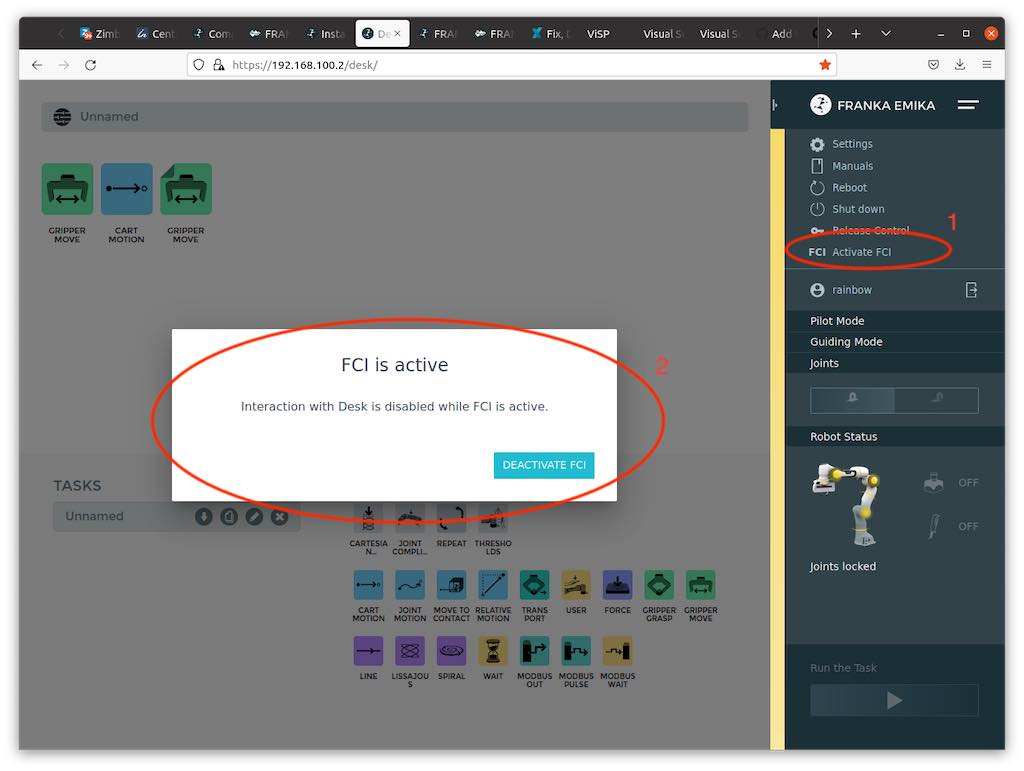
The first thing to do is activate the FCI on the panda robot we want to use for the demo. To do this we should connect to the IP of the robot we want to control, open the brakes, and then activate the FCI.
Launch files
The launch files we want to use are located in the:
-
panda_utils package
-
yolo_bringup subpackage of the yolo_ros package
-
kinect_ros2 package
-
image_processing package
Once the launch files have been launched, we can launch the demo's gui app with:
ros2 run demo_visualization_app color_app "state_color" "human_contact"
we can proceed to:
- activate the impedance controller
- activate the demo
Example of file launching
ros2 launch yolo_bringup yolov8.launch.py model:=yolov8n-pose.pt max_det:=1\
input_image_topic:=/image_raw input_depth_topic:=/depth/image_raw\
input_depth_info_topic:=/camera_info target_frame:=kinect_rgb\
use_3d:=True use_sim_time:=False

ros2 launch kinect_ros2 stream_kinect.py

ros2 launch image_processing launch_yolo_tracker.py measurement_noise:=0.9\
hallucination_threshold:=0.0 single_keypoint_ma_confidence_threshold:=0.80\
ma_confidence_threshold:=0.80 MA_window_size:=10 use_sim_time:=false\
filter:=true debug:=true predict:=false

ros2 launch panda_utils launch_utils.py controller_kp:=1500.0 controller_kd:=140.0\
controller_md:=5.0 controller_rate:=1000.0 alpha:=30.0 task_gain:=0.0\
use_sim_time:=false controller_kp_rot:=100.0 controller_kd_rot:=5.0\
controller_md_rot:=0.5